Video giải thích bản đồ vệ tinh — Phong cách bản tin vệ tinh
Make an explainer video on real satellite imagery: flyovers, pins, routes and sources on screen. Made for geography, conflicts, trade routes and the news.
Có từ Starter, với tất cả 24 phong cách cùng phong cách riêng của bạn · xem trước được render bởi công cụ ClipOnIt
Phong cách này trông như thế nào
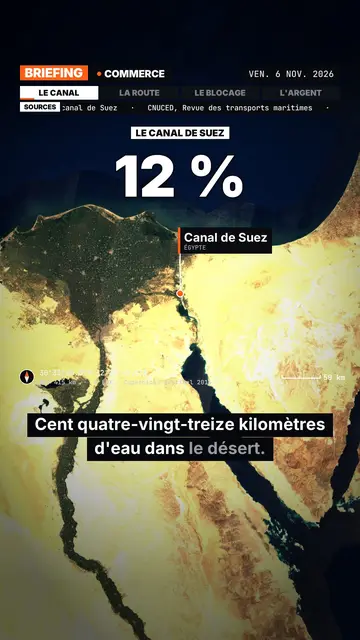
Satellite briefing tells your topic from above, on real satellite imagery. In each scene, the camera climbs then dives onto the next place, and drops a pin with the place's name and country. It can also point at several places at once or draw a route between two points, with labelled ends: a shipping lane, a pipeline, a front line.
Around the map sits an investigation-desk frame: series label, topic, date, chapter tabs and a scrolling “Sources” line that includes the imagery credit. Instruments fill out the screen (compass, coordinates, altitude, scale bar). On the dimmed map, an inset can show a library element, an image you import or data bars, and captions light up word by word.
Các chủ đề phù hợp
Avoid: topics that do not happen anywhere in particular (psychology, tips, abstract ideas) and indoor scenes: the map then has nothing to show. The imagery is a cloud-free mosaic from a single year, so it cannot show a recent change on the ground.
- Geography and bordersShowing where a strait, an enclave or a disputed border sits beats describing it.
- Conflicts and world newsPins and routes place the facts, and the sources line reminds viewers where the information comes from.
- Trade and supply chainsA cargo ship crossing a canal, coffee crossing an ocean: the drawn route makes the journey obvious.
- MegaprojectsA dam, a new city or an airport makes more sense when you can see its footprint on the ground.
Ý tưởng video theo phong cách này
- Why the Suez Canal matters so much
The camera follows a cargo ship from Asia to Europe, then draws the detour around Africa if the canal closes.
- The journey of a coffee bean
A pin on a plantation, another on a port, then the route all the way to your cup.
- What is at stake in a strait
Zoom on the passage, the bordering countries pinned, and data bars on the traffic going through.
- A city built in the desert
A flyover of the site, a scale bar on screen, and an inset with the project image you import.
Chỉ cần 1 cú nhấp
- Mở liên kết của phong cách này
Nút “Tạo video theo phong cách này” mở trình chỉnh sửa với phong cách này đã được chọn sẵn. Không có tài khoản thì đăng ký chỉ mất một phút và không cần thẻ.
- Viết chủ đề của bạn trong một câu
Một ý tưởng là đủ. Bạn cũng có thể dán văn bản hoặc, từ Starter, đọc to vào micro: video sẽ được xây dựng theo giọng của bạn.
- Xem lại rồi xuất video
AI viết các cảnh, chọn các thành phần của phong cách và canh thời gian theo từng lời, kèm giọng nói và phụ đề. Bạn chỉnh những gì chưa ổn, rồi file MP4 dọc sẽ sẵn sàng trong vài phút.
Bạn có thể điều chỉnh gì
You can write the series label, topic, date and chapters on the bar, the list of sources, the stamp title, the kicker and the big figure. Places are given by name: AI puts them on the map, and you can add pins or draw a route. For an inset, pick a library element, import your image or enter data bars. Length, narration and three variants per scene stay adjustable; from Starter, your own voice and the AI Director.
Frequently asked questions
Miễn phí hay không, đầu ra, công dụng: câu trả lời ngắn gọn.
Is the satellite imagery real?
Yes. The views come from a public, cloud-free satellite mosaic, credited on screen and in the sources line. They are archive images, not live views.
Does the AI make up sources?
No. The script is written never to invent a source: you add your own, and the “Sources” line shows what you provided.
How far can it zoom in?
Down to the scale of a city or a large site, such as a port or a dam. You cannot make out a single house or car.
Phong cách này có trong gói miễn phí không?
Không, có trong Starter ($29/tháng): 15 video không hình mờ mỗi tháng, tất cả 24 phong cách cùng phong cách riêng của bạn. Gói miễn phí cho 3 video mỗi tháng có hình mờ, trong 8 phong cách khác: Pixel News, Press paper, Comedy cartoon, Class sketch, Night tale, Social screen, Retro synthwave và Flat vector.
Nếu bạn thích phong cách này
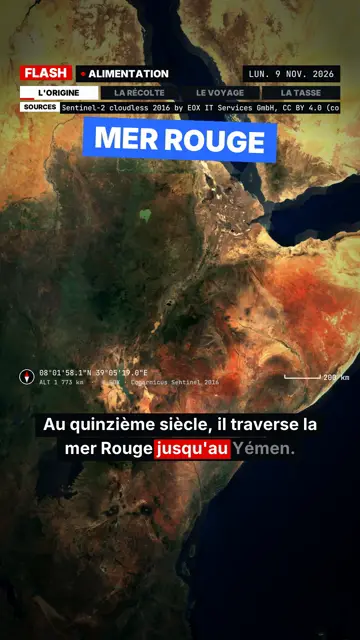
Breaking news explainer video
Flash brief style · News without a dull second: slammed captions, word-tracking box, satellite map and black panels.
- Miễn phí
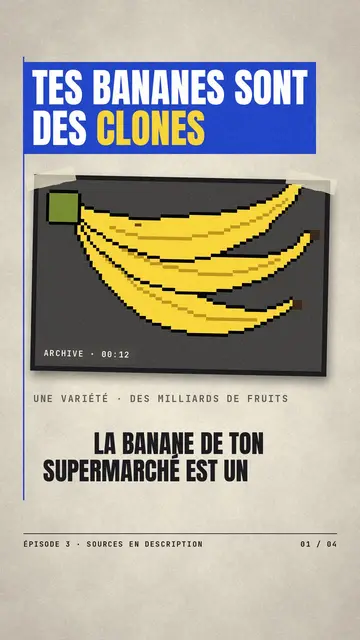
Video tin tức cắt giấy
Phong cách giấy báo · Giấy tạp chí kem, băng rôn xanh và đỏ, con dấu.
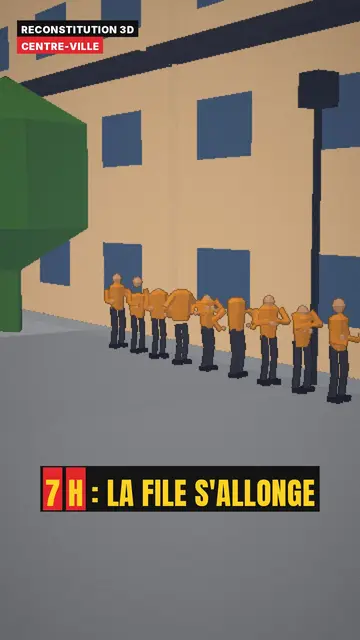
3D reconstruction animation
3D reconstruction style · Colourful daylight low-poly streets and interiors.
Ý tưởng của bạn, theo phong cách này
Viết một câu hoặc nói ra: phong cách đã được chọn sẵn khi bạn vào trình chỉnh sửa.