Content creator video — Thumbnail wall style
Make a video for content creators: a wall of video thumbnails on midnight blue, a zoom through the wall, gold serif numbers and a growth curve on the word.
Có từ Starter, với tất cả 81 phong cách cùng phong cách riêng của bạn · xem trước được render bởi công cụ ClipOnIt
Phong cách này trông như thế nào
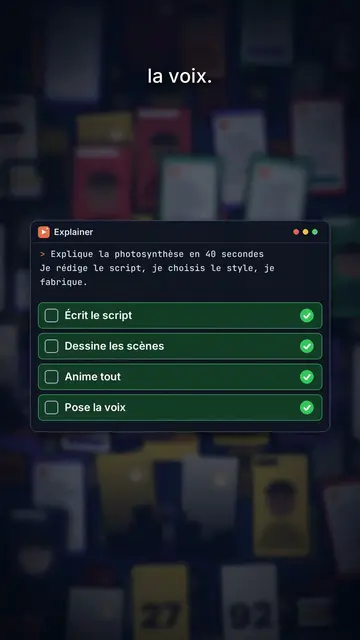
Thumbnail wall covers a midnight blue background with dozens of video thumbnails set in depth, like a wall of content stretching out of sight. The camera moves forward and passes through the wall: thumbnails in the middle plane stay sharp, those in front and behind blur. The big title at the top centre mixes a bold white sans-serif with words in italic serif, and key words get framed by small orange corners, like in a viewfinder.
Numbers show in giant gold serif and roll to their value, with a mono line underneath. When an object is needed, a card comes in on the word: a 3D product box in chains whose padlock pops open, a code window with a checklist, a growth curve drawing itself, a grid. The wall can darken and blur behind a card, a green “FREE” stamp lands, and the end types “Comment WORD” into a field.
Các chủ đề phù hợp
Avoid: topics unrelated to screens or content, like cooking, nature or ancient history: the thumbnail wall would make no sense. Also avoid sad topics; the tone stays one of growth.
- Content creation methodsThe thumbnail wall speaks to creators straight away: it is their daily life.
- Tools and products to unlockThe chained box whose padlock pops shows the access you get.
- Growth figuresThe rolling gold number and the rising curve make a result feel credible.
- Free offersThe green “FREE” stamp and the comment field push viewers to act.
Ý tưởng video theo phong cách này
- Nobody filmed any of these videos
The thumbnail wall, the “Zero filming” title, the gold number and the “FREE” stamp.
- Post every day without burning out
The video grid, the checklist in the code window and the rising curve.
- The format that got me to 10,000 subscribers
The zoom through the wall, the rolling number and the key word in orange corners.
- The tool I use for my thumbnails
The chained box opening, the grid and the “Comment TOOL” field.
Chỉ cần 1 cú nhấp
- Mở liên kết của phong cách này
Nút “Tạo video theo phong cách này” mở trình chỉnh sửa với phong cách này đã được chọn sẵn. Không có tài khoản thì đăng ký chỉ mất một phút và không cần thẻ.
- Viết chủ đề của bạn trong một câu
Một ý tưởng là đủ. Bạn cũng có thể dán văn bản hoặc, từ Starter, đọc to vào micro: video sẽ được xây dựng theo giọng của bạn.
- Xem lại rồi xuất video
AI viết các cảnh, chọn các thành phần của phong cách và canh thời gian theo từng lời, kèm giọng nói và phụ đề. Bạn chỉnh những gì chưa ổn, rồi file MP4 dọc sẽ sẵn sàng trong vài phút.
Bạn có thể điều chỉnh gì
For each scene you pick the shot (sharp wall or darkened wall behind the cards), the title and its serif words, a gold number with its line, a card on the word (box, code, curve, grid or element), a stamp, a small note at the bottom and the word to comment at the end.
Câu hỏi thường gặp
Miễn phí hay không, đầu ra, công dụng: câu trả lời ngắn gọn.
Are the wall thumbnails real videos?
No, they are thumbnails drawn by the engine, with no real channel or creator. You can import your own images if you want to show your work.
Tôi có thể dùng giọng nói của riêng mình không?
Yes. Record yourself or import your audio: the zoom, numbers and cards lock onto your words.
How is it different from Social screen?
Social screen recreates a social feed with a profile, counters and comments. Thumbnail wall shows a wall of videos in depth crossed by the camera, with product cards.
Phong cách này có trong gói miễn phí không?
Không, có trong Starter ($29/tháng): 15 video không hình mờ mỗi tháng, tất cả 81 phong cách cùng phong cách riêng của bạn. Gói miễn phí cho 3 video mỗi tháng có hình mờ, trong 8 phong cách khác: Pixel News, Press paper, Comedy cartoon, Class sketch, Night tale, Social screen, Retro synthwave và Flat vector.
Nếu bạn thích phong cách này
- Miễn phí
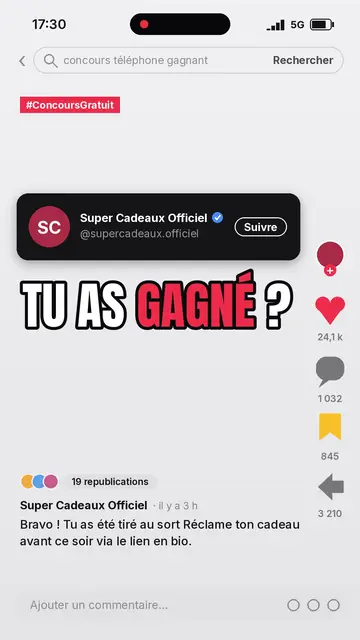
Video giải thích cho mạng xã hội
Phong cách màn hình mạng xã hội · Một dòng tin mạng xã hội được tái tạo: hồ sơ, bộ đếm, bình luận.

AI coding tutorial video
Twilight desktop style · A fake computer desktop on a violet-pink sunset: windows swinging in 3D, a walking avatar.

Cut-out photo dialogue video
Cut-out photo style · Black-and-white people cut out like stickers on a blue-violet gradient, a giant navy title.
Ý tưởng của bạn, theo phong cách này
Viết một câu hoặc nói ra: phong cách đã được chọn sẵn khi bạn vào trình chỉnh sửa.